
Claude Code
AI assistant · MCP
Use yggy tools from the terminal while you work in a repo.
Available in Developers → MCP client
yggy exposes a Streamable HTTP MCP server. Connected clients can search graph data, inspect documents, use graph-analysis tools, and propose graph changes.
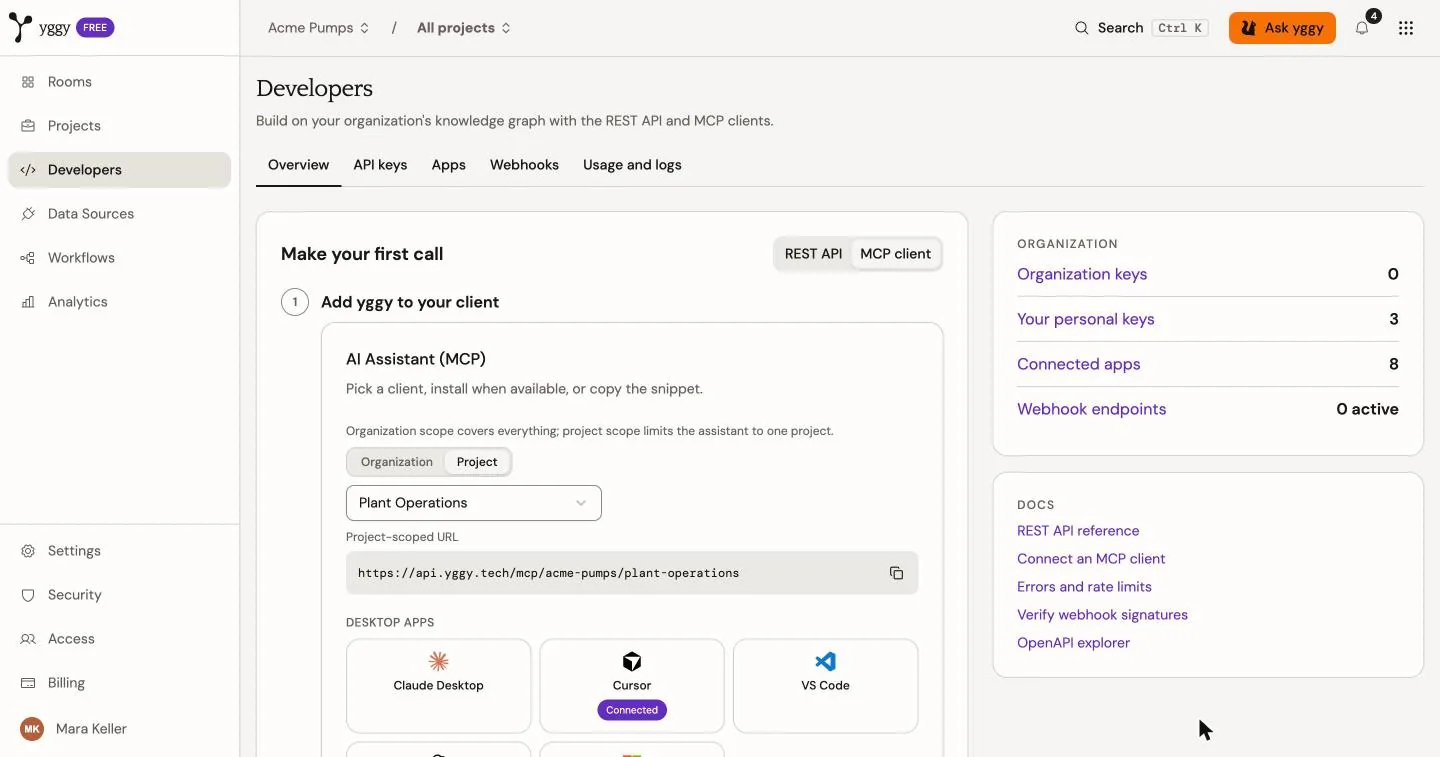
Open Developers. On Overview, switch Make your first call to MCP client. Choose Organization or Project scope. It shows MCP URLs and setup for current clients such as Claude Code, Claude Desktop, Cursor, VS Code, OpenCode, and Gemini CLI. Each client below has a setup page.
AI assistant · MCP
Use yggy tools from the terminal while you work in a repo.
Available in Developers → MCP client
AI assistant · MCP
Chat with the graph from the Claude desktop app.
Available in Developers → MCP client
AI assistant · MCP
Call yggy from the Cursor agent while you edit code.
Available in Developers → MCP client
AI assistant · MCP
Add yggy as an HTTP MCP server in Visual Studio Code.
Available in Developers → MCP client
AI assistant · MCP
Reach the graph from Gemini's command-line client.
Available in Developers → MCP client

AI assistant · MCP
Register yggy as a remote MCP server in OpenCode.
Available in Developers → MCP client
Example: open Developers, switch to MCP client, choose Project and the project, then Cursor, copy the project-scoped URL, and authorize in the browser. After consent, Cursor appears in Developers → Apps.
You can connect with any of these URL shapes (replace host, org, and project for your deployment):
| URL | Scope |
|---|---|
https://<api-host>/mcp | Organization from the OAuth token |
https://<api-host>/mcp/<org-slug> | Same, with an explicit org check |
https://<api-host>/mcp/<org-slug>/<project-slug> | Project pin (recommended); sets defaults automatically |
For Claude Code, prefer the project-scoped URL:
claude mcp add --transport http yggdrasil https://<api-host>/mcp/<org-slug>/<project-slug>Other clients use an HTTP server entry:
{ "mcpServers": { "yggdrasil": { "type": "http", "url": "https://<api-host>/mcp/<org-slug>/<project-slug>" } }}The first connection opens yggy in a browser. Sign in, select the organization, review the requested scopes, and choose either:
The supported OAuth scopes are:
| Scope | Access |
|---|---|
graph:read | Read and analyse graph data. Required. |
graph:write | Propose graph changes. Optional; on by default. |
graph:review | Resolve the Review and Identities inboxes. Optional; off by default. Does not come with graph:write. |
documents:read | Read document context. Optional; on by default. |
documents:write | Use document write capabilities when a tool supports them. Optional; on by default. |
docs:read | Search and fetch the published user guide and API reference. Optional; off by default. This is public documentation, not your organization’s graph. |
offline_access | Let the client refresh access without a new sign-in. |
Agents that are not connected to yggy can still read the docs site: start at /llms.txt, then fetch one {page}.md file (for example /guides/get-started.md). Connected clients use search_docs, get_doc, and get_openapi only when you grant docs:read. get_openapi lists matching methods by default; set detail to include one operation’s schemas.
MCP also lists the ontology and identity HTTPS catalogs (ontology.yggy.tech and id.yggy.tech). These match the public ontology and identity sites. They require graph:read. They are not the user guide (docs:read).
After connect, list resources. You should see at least:
https://ontology.yggy.tech/: global vocabulary as Turtlehttps://ontology.yggy.tech/org/{your-org-id}/: organization overlayhttps://id.yggy.tech/identifier-spaces: approved identifier schemesRead the global ontology. The Turtle names the organization class:
resources/read https://ontology.yggy.tech/The payload includes @prefix ygg: for that host and a class such as ygg:classes/organization. Read one class as JSON:
resources/read https://ontology.yggy.tech/classes/organizationEntity identity URIs (https://id.yggy.tech/org/{org}/entities/{id}) resolve to the same graph context as graph://entity/{uid} when the URI belongs to your organization. A URI for another organization returns no contents.
Read tools run directly. Destructive or sensitive actions use a preview and confirmation flow. MCP clients that support elicitation show the proposed change before commit.
Agents triage the same Review and Identities queues that humans see. Extraction still creates the offerings. The agent lists, explains, and proposes; a commit does exactly what the same action in the yggy app does.
tools/call list_review_inboxtools/call get_review_item {"kind":"ontology_proposal","id":"<proposal-id>"}tools/call resolve_review_item {"kind":"ontology_proposal","id":"<proposal-id>","action":"approve"}list_review_inbox and get_review_item need graph:read. resolve_review_item needs graph:review and a confirmation. Do not close inbox items with merge_entities or update_triple.
If graph mappings do not contain a required source detail, call get_document_content. It returns structured source records first, then bounded text parts. Each part has a stable ID, order, content, and source location. Increase part until totalParts is reached. The tool requires documents:read.
Developers → Apps lists your connected clients and their scopes. Organization owners and admins can also review other members’ connections. Revoke a connection when a client or device should no longer have access.