
Data Explorer
Use Data Explorer when you need a list instead of the visual graph. It has separate tables for Entities, Triples, and Documents.
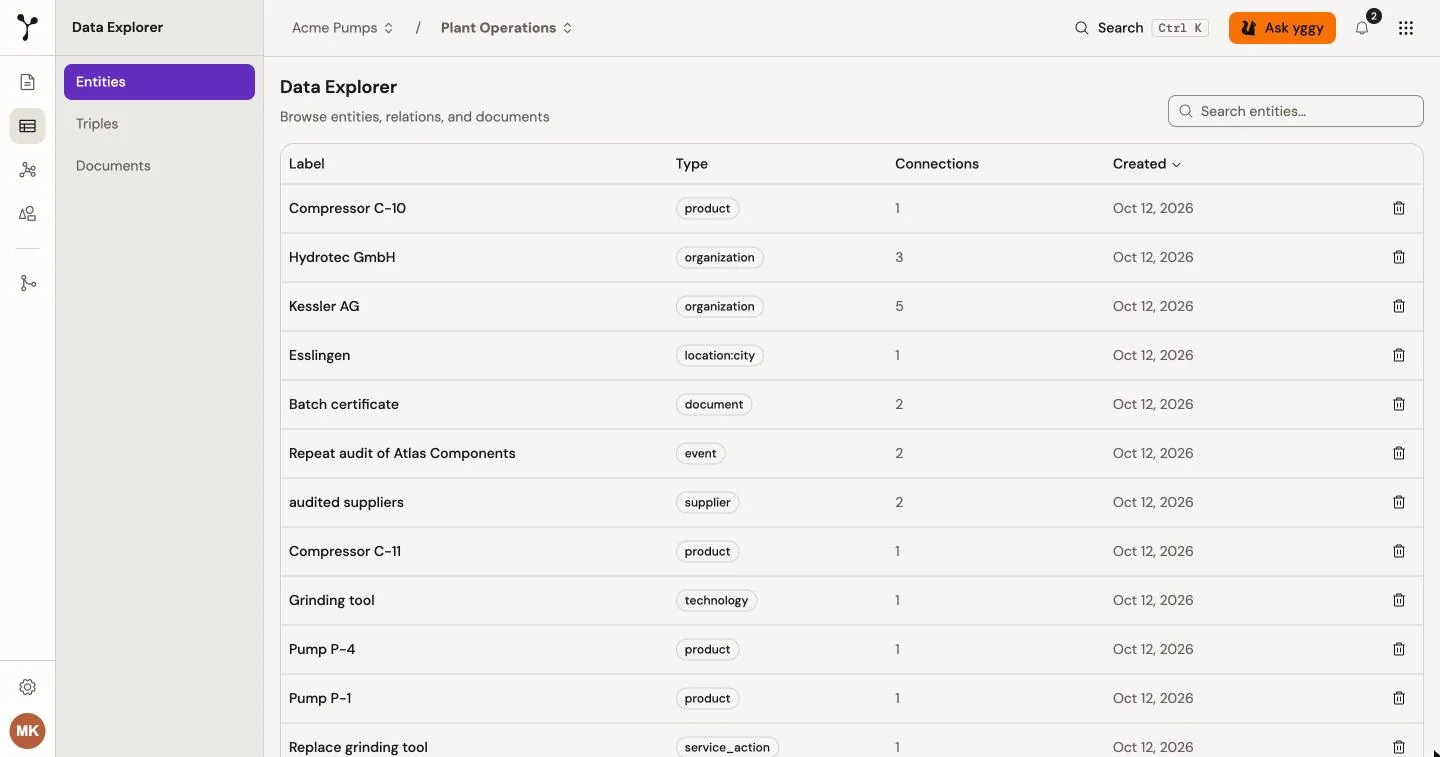
Find a record
Section titled “Find a record”- Select a project when you want to limit the results to that project.
- Open Data Explorer.
- Select Entities, Triples, or Documents.
- Enter a search term.
- Select a row to inspect its details.
For example, select the Supplier research project and search the Entities table for Atlas. Open Atlas GmbH to inspect its incoming and outgoing relations. Then select Open in graph to see those relations in context.
The organization-wide route searches the data that you may access across the organization. A project route limits the tables to the active project.
What each table shows
Section titled “What each table shows”| Table | Use it to |
|---|---|
| Entities | Compare labels, types, connection counts, and creation dates. Open a row to inspect incoming and outgoing relations. |
| Triples | Compare subjects, predicates, objects, source counts, confidence, and status. Open a row to inspect available evidence and extraction details. |
| Documents | Check document status, triple count, extraction method, and creation date. Open a row to go to document detail. |
Delete graph data
Section titled “Delete graph data”Users with the required permission can delete an entity or triple from its table.