
Review graph suggestions
Use Review for the cases that still need a person. The project analyzes every same-name cluster first. Confident duplicates merge on their own. Unclear cases stay here with a one-sentence reason. See Entity resolution for the identity-URI connection rule.
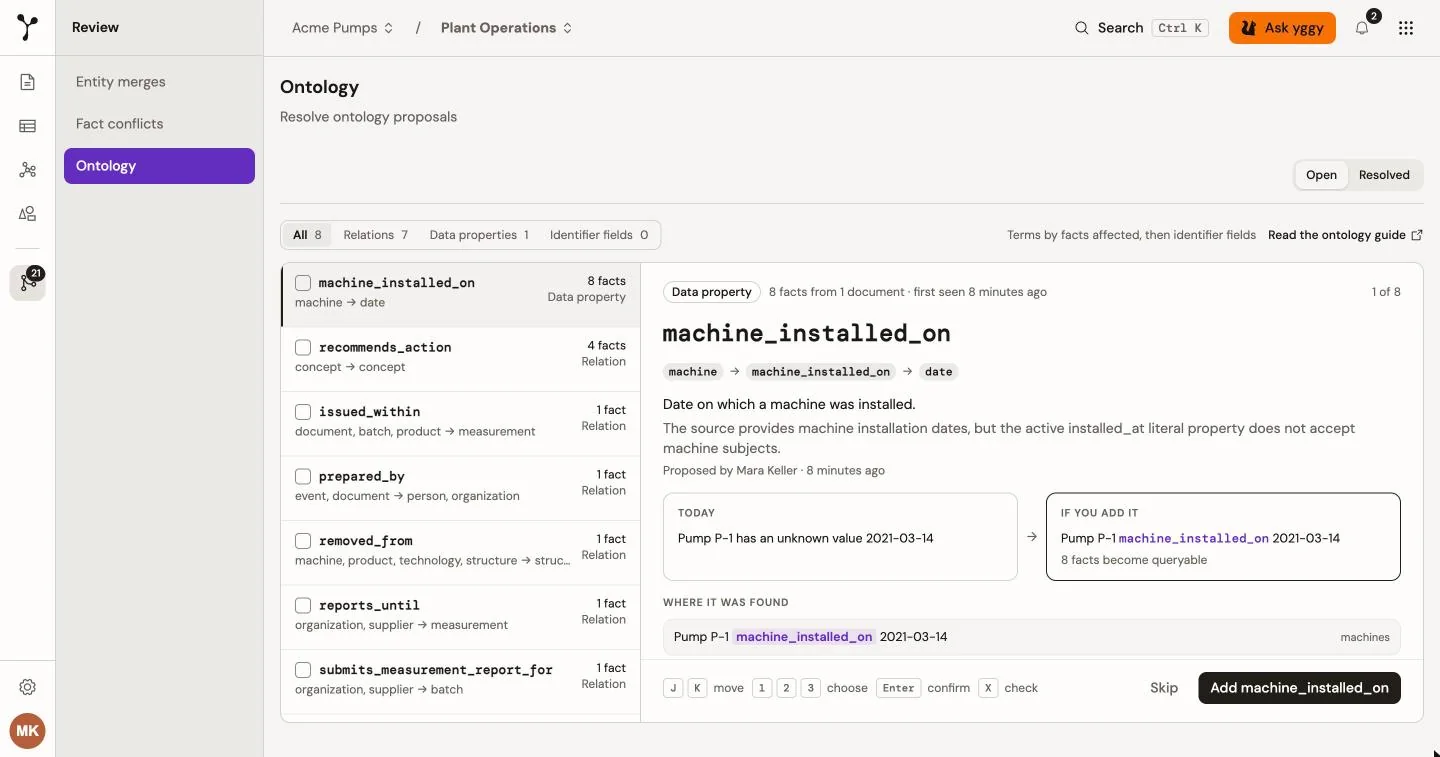
Review has three tabs: Entity merges, Contradictions, and Ontology. Ontology shows the same proposals as the ontology workspace. See Inspect the ontology workspace for how to decide them.
Entities are organization-wide, but automatic connection requires the same stable identity URI from an organization-approved HTTPS identifier namespace. Identity comes from the exact namespace and source value. An unapproved type and source field wait on Ontology → Identities instead of minting an organization entity. Similar labels stay review-only. Facts and evidence remain project-scoped.
How the Review page works
Section titled “How the Review page works”Entity merges and Contradictions share one layout: a queue on the left and one decision on the right. On a narrow screen the queue sits above the decision.
- The queue shows a progress line, such as
3 of 12 decided, and the item you are on. Select an item, or move with the keys below. - Open lists what still needs a decision. Resolved lists what is done, with Undo where it applies.
- Skip an item with Skip. It stays in the queue and you move on to the next one.
- When you finish the last open item, Review shows
You’re all caught up. - When Review shows all projects, an item from another project carries a project badge in the queue and in the decision. Your decision always applies to the project that item belongs to.
Keyboard shortcuts work while no dialog, text field, or picker is open:
| Tab | Keys |
|---|---|
| Entity merges | J and K move down and up the queue. 1 chooses Merge all into the canonical variant. 2 chooses They are different. Enter confirms. |
| Contradictions | J and K move down and up the queue. 1, 2, and 3 choose the first, second, and third option. Enter confirms. |
Review a proposed entity merge
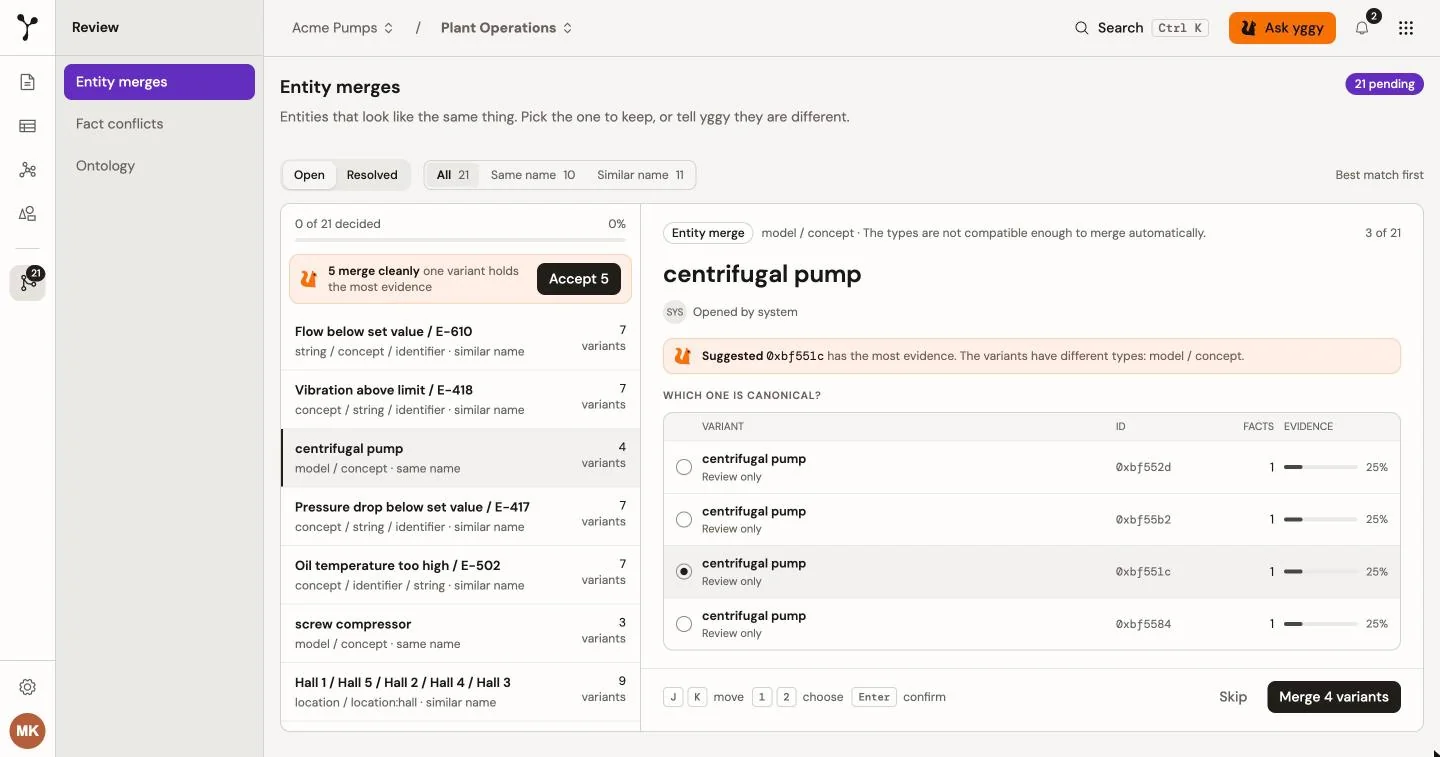
Section titled “Review a proposed entity merge”Each queue row names the entity and shows its type, whether the name is the same or only similar, and how many variants the cluster has. The queue starts with the best match. Use the filter to show All, Same name, or Similar name.
- Open Review → Entity merges → Open.
- Select a cluster. The header gives the reason it stayed in Review.
- Under Which one is canonical?, select the variant that must survive. The table lists each variant with its ID, its number of facts, and its share of the evidence. A long cluster shows the first few rows; select Show all for the rest.
- A Suggested line names the variant with the most evidence. If the variants have different types, the line says so. Read it before you merge.
- Under Evidence for the chosen variant, read the sources that support it.
- Under Decision, choose Merge all into the chosen variant, or They are different. Add a note with Add note if you want to record why. The note is optional.
- Select the confirm button. It reads Merge n variants or Keep apart, and it works the same as Enter.
Merge all into opens a confirmation first. It states how many variants merge and how many link references move. Select Merge variants to go ahead.
They are different keeps the whole group apart. yggy does not propose the group again.
The server checks the current open suggestions again before it changes the graph. It rejects a stale, disconnected, cross-project, or unrelated selection. It also rejects a source entity that has active links in another project, because one project decision cannot rewrite another project.
For example, a review can show two 0.4 measurement entities. One has record_id in records; the other has machine_id in assets/machines. Check the record as the canonical variant. The confirmation states that 1 variant merges and shows its current link count. The server validates the current links again when you confirm.
Choose They are different when the same label refers to different concepts, such as the Atlas product and the Atlas company. When a group mixes types like this, the Suggested line shows the types, and the group never joins the batch merge below.
Merge clean pairs in one step
Section titled “Merge clean pairs in one step”When pairs are clear-cut, the top of the queue shows a strip such as 3 merge cleanly with the hint one variant holds the most evidence. A pair qualifies when it has exactly two variants of the same type and one of them clearly leads.
- Select Accept 3.
- Read the confirmation, Merge 3 pairs? For each pair, the variant you picked stays. If you picked none, the variant with the most evidence stays. The other merges into it.
- Select Merge.
The merges run one after another. If one fails, yggy stops there, keeps that cluster selected, and shows the error on it. Nothing after it is merged.
What happens when you confirm
Section titled “What happens when you confirm”flowchart TD
A[Document mention] --> A1{Stable identity URI?}
A1 -->|Yes| A2[Reuse the organization entity]
A1 -->|No| A3[Create a separate entity]
A3 --> B[Compatible label or identifier signal found]
B --> C[Create a project-scoped review pair]
C --> D[Group connected pairs in that project]
D --> E[Analyze the cluster]
E -->|Confident and project merges automatically| K[Validate and merge the winner and losers]
E -->|Uncertain, or project reviews every case| F[Reviewer chooses one canonical variant]
F --> G[Show the evidence and link impact]
G --> H{Merge all into it?}
H -->|They are different| M[Keep the group apart]
H -->|Merge| I[Server reloads and validates the open pair graph]
I -->|Selection changed or is invalid| L[Reject and refresh the review]
I -->|Valid and project-bound| K
The suggested variant is the one with the most evidence. Automatic merge uses that variant and every other member when the analysis is confident. A leftover cluster stays in Review when identities disagree, types do not match, or the names are not the same thing.
To keep every candidate in Review, open Project settings → General and choose Review every entity merge.
Resolve a contradiction
Section titled “Resolve a contradiction”A contradiction appears when two facts cannot both be true, for example one relation that holds a single value. Each queue row shows the subject, the relation, and the two values, with the newest contradiction first.
- Open Review → Contradictions → Open.
- Select a contradiction. The header says when yggy found it and in which document. A short reason explains why only one fact can be right.
- Compare the two cards. In the graph is the fact yggy already holds. New is the fact that came in with the latest document, and the card names that document. When yggy has a trust score for a fact, its card shows how far yggy trusts it.
- Under Decision, choose one of three options:
- Keep the fact in the graph. The new fact is kept as history and no longer counts as current.
- Use the new fact. It replaces the existing fact, which is kept as history.
- Both are right. Both facts stay, for example when they describe different people.
- Select the confirm button. It reads Keep and the value, Use and the value, or Keep both. Enter does the same.
For example, the graph can place Atlas GmbH in Berlin, while a fact from Q4-report.pdf places it in Munich. If the report is right, choose Use Munich; if not, choose Keep Berlin. Choose Both are right when both facts are correct and must remain separate.
If a fact is missing its subject, relation, or value, the card shows Unknown in its place. You can still decide the contradiction.
Undo decisions
Section titled “Undo decisions”Switch to Resolved to see finished items, with who decided and when. Undo reopens a discarded entity suggestion or a contradiction decision. A merge that cannot be reversed shows no Undo. Undoing a merge splits the entities again and moves the links that the merge moved back to the entity they came from. Links added to the surviving entity after the merge stay there. Merges made before yggy recorded merge history cannot move links back; their links stay on the surviving entity.