
Security
yggy combines organization roles, project roles, and scoped credentials. Use the Security pages to review the controls available in your deployment.
Sign-in
Section titled “Sign-in”The sign-in page supports email and password, passkey, Google, GitHub, and Microsoft. Your deployment configuration determines which methods are available.
Connect another sign-in method
Section titled “Connect another sign-in method”To add Google, GitHub, or Microsoft to an existing account, sign in the way you usually do, open your profile settings, and choose Connect next to the provider in the Sign-in section. The provider account can use a different email address than your yggy account.
yggy connects an account only when the provider confirms that the email address is verified. Google, GitHub, and Apple always do. Microsoft needs the setup below. If a connection is refused, the Sign-in section shows the reason.
Microsoft sign-in setup
Section titled “Microsoft sign-in setup”For deployment operators. Register an app in Microsoft Entra ID (App registrations) and configure it as follows:
- Authentication: add a Web platform with the redirect URI
https://<your API host>/api/v1/auth/callback/microsoft. It must match exactly:https, no trailing slash. - Token configuration: add these optional claims to the ID token:
emailxms_edovverified_primary_emailandverified_secondary_email
- Manifest: keep
acceptMappedClaimsatnullorfalse.
With this setup, yggy treats a Microsoft email address as verified when one of these is true:
- The person’s organization has verified that it owns the email domain in Entra ID (
xms_edov). - The address appears in the organization’s verified email list.
- The person signs in with a personal Microsoft account on a Microsoft address, such as
outlook.comorhotmail.com.
Any other Microsoft address, for example a personal account on a gmail.com alias, is not treated as verified. Without that check, an Entra admin in any organization could put someone else’s email address on a user and take over that person’s yggy account.
Roles and project boundaries
Section titled “Roles and project boundaries”Organization roles control organization-wide actions such as billing, members, providers, and security settings. Project roles control access to documents, graph data, chat, and project settings.
Organization owners and admins can access every project. Members and viewers can access projects where they have a project membership. See Members & roles for the default permission sets.
API tokens
Section titled “API tokens”Owners and admins open Developers → API keys to create and revoke organization keys. An organization key acts as the organization with exactly its own permissions, which can’t exceed the creating admin’s role. It keeps working when its creator leaves, so revoke keys you no longer need. Choose only the permissions that the client needs, and set an expiry when possible.
Personal keys act as you and stop working when you leave the organization.
The token value is shown when you create it. Store it in a secret manager and revoke it if it is exposed.
AI assistant connections
Section titled “AI assistant connections”MCP clients use OAuth. graph:read is required. The client can also request graph:write, graph:review, documents:read, documents:write, and docs:read. See How MCP works for what each scope allows. During consent, you can keep a connection organization-wide or limit it to one project. Revoke a connection from Developers → Apps.
Write actions that can change graph data require confirmation in clients that support MCP elicitation.
SSO and policies
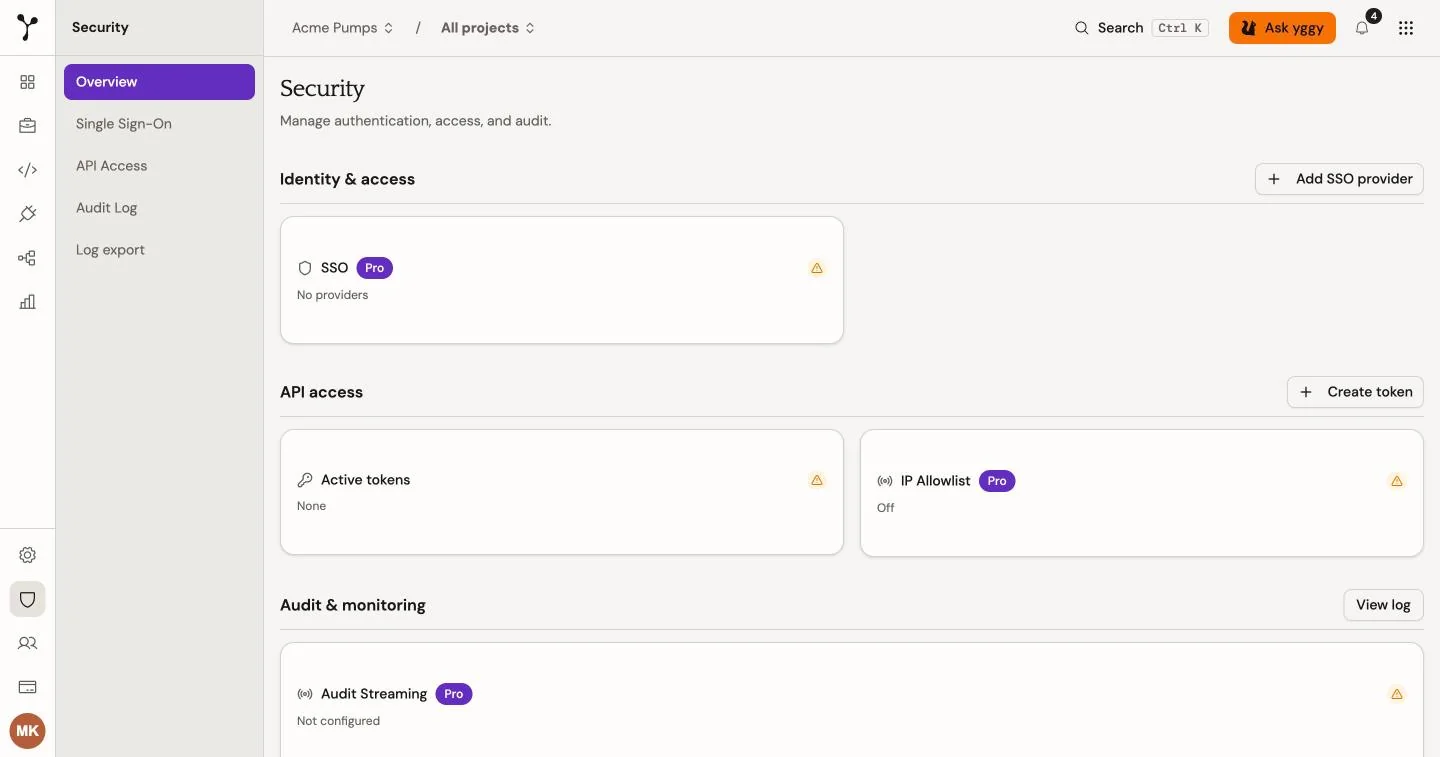
Section titled “SSO and policies”Security → SSO lets organization admins on a Pro or Enterprise plan connect an enterprise identity provider (Okta, Microsoft Entra ID, Google Workspace, or a custom OIDC IdP). Free organizations see the page locked with an upgrade path.
A verified work email domain is required before you can add an identity provider.
Claim and verify a domain
Section titled “Claim and verify a domain”-
Open Settings → General and add the work email domain (for example
acme.com). -
Add a DNS TXT record:
- Name:
_yggy-verification - Content: the token shown in the dialog
On
acme.comthe full hostname is_yggy-verification.acme.com. - Name:
-
Wait for DNS to propagate, then choose Check DNS.
Add an identity provider
Section titled “Add an identity provider”After the domain is verified, open Security → SSO and add a provider. Choose the verified domain, then enter the identity-provider details.
Copy the Redirect URL from the dialog and paste it into the identity provider as the sign-in redirect URI.
SSO discovery with a work email is available only after the domain is verified and an identity provider is connected.
API access (IP allowlist for API keys and MCP clients) is also a Pro feature.
How members sign in
Section titled “How members sign in”Members can start SSO in either way:
- Work email — on the sign-in page, enter an address on the verified domain (for example
[email protected]), continue, then choose Continue with Acme Corp SSO. - Organization slug — open
/auth/login?org=acmeto show the SSO button for that organization.
Availability depends on the deployment and its identity-provider configuration. Test an SSO connection before you rely on it for team access.
Audit activity
Section titled “Audit activity”Security → Audit log (Pro or Enterprise) records supported authentication, organization, provider, and MCP events. Use it to review who performed an action and whether it succeeded. Organizations on Free can upgrade to unlock the log and optional event streaming.
Security → Log export (Pro or Enterprise, admins) sends your events to your own OpenTelemetry-compatible log tool. Choose which streams to send: Audit events, API requests, or both. Audit events are delivered with retries. API requests are sent on a best-effort basis, so a short outage on your side can leave gaps. Requests also stay visible for 30 days under Developers → Usage and logs. See Export logs over OTLP for the record format.
Apart from the 30-day request log above, this product guide does not state retention periods. It also does not state encryption algorithms or data-residency guarantees. Those are deployment and contract properties. Use your security agreement or contact your operator for the terms that apply to your environment.